
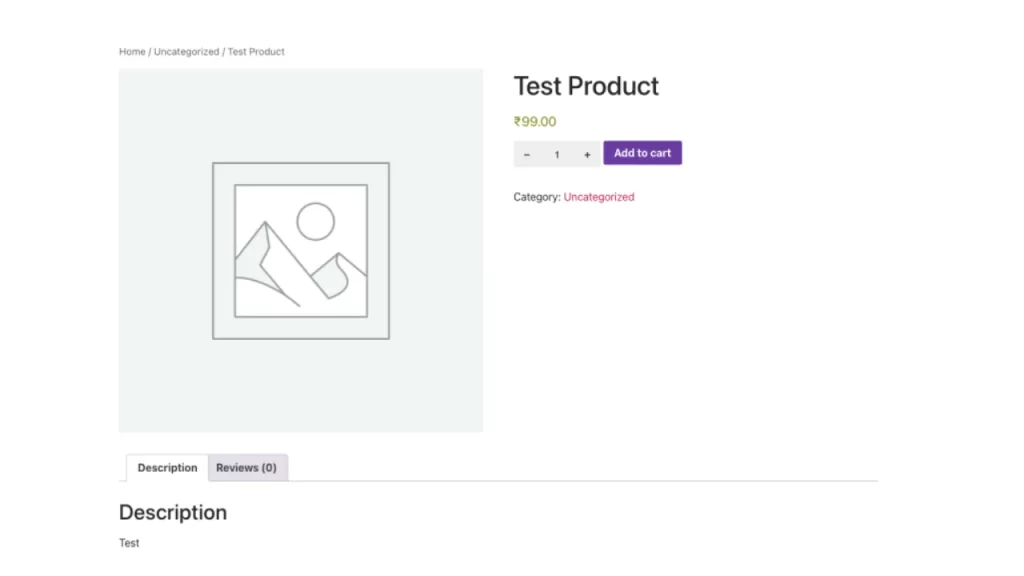
QuantityPro for WooCommerce is a lightweight WooCommerce plugin that enhances the product quantity selection experience by adding intuitive plus (+) and minus (-) buttons to quantity input fields on product pages and shopping carts.
This plugin works seamlessly with WooCommerce and provides a better user interface for customers to adjust product quantities without manually typing numbers. The buttons respect minimum and maximum quantity constraints set for each product.
Key Features
- ✓ Adds plus and minus buttons to product quantity selectors
- ✓ Fully responsive design optimized for mobile devices
- ✓ Clean, modern aesthetic that integrates with any storefront design
- ✓ Zero configuration – just install and activate
- ✓ Lightweight and performance-optimized
- ✓ No modifications to WooCommerce templates
- ✓ Respects product minimum and maximum quantity settings
- ✓ Compatible with WooCommerce HPOS (High Performance Order Storage)
- ✓ Works on both product pages and shopping cart
- ✓ Compatible with WordPress 5.8+ and PHP 7.4+
How It Works
Once activated, the plugin automatically:
1. Adds a minus (-) button before the quantity input field
2. Adds a plus (+) button after the quantity input field
3. Allows customers to increment/decrement quantity with simple clicks
4. Respects product-level quantity limits (min/max)
No additional setup or configuration required!