Hello there! I’m Bonny Elangbam, and I’ve spent the better part of a decade navigating the shifting sands of search engine optimization.
I wrote this guide because I’m tired of seeing brilliant creators, small business owners, and passionate hobbyists lose out to Google’s algorithm simply because of a few hidden toggles and checkboxes.
This is more than just a list of tips; it’s a comprehensive roadmap designed to help you reclaim your digital presence and ensure your voice is actually heard in the crowded wilderness of the internet.
Why Your WordPress Site Is Ghosting Google
You have perfected your content, yet traffic is nonexistent. It’s rarely your writing. More often, hidden WordPress SEO mistakes block Google from indexing your site.
Drawing on years of experience, I will uncover five critical errors killing your growth.
1. The “Invisible” Setting: Discouraging Search Engines
This is perhaps the most common and most avoidable WordPress SEO mistakes. It usually happens during the site development phase when designers want to keep unfinished pages hidden from the public.
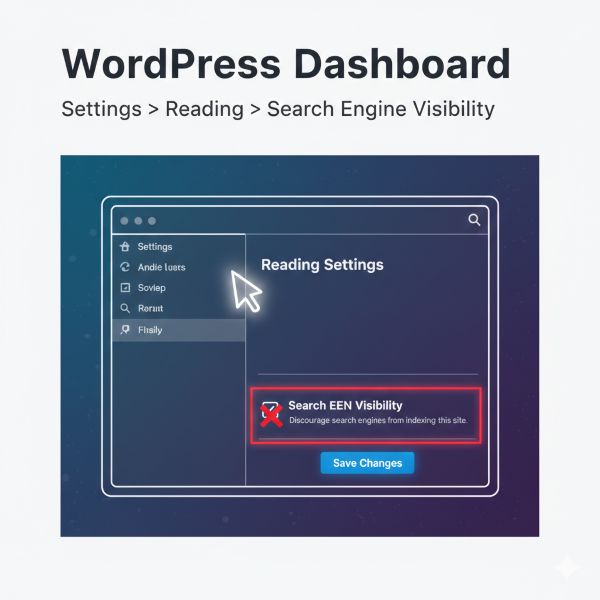
The Problem: Developers often check a specific box to hide a site during construction. The disaster occurs when they forget to uncheck it after the site goes live. This leaves your site invisible to Google for months, regardless of how great your content is.
The Fix: Navigate to Settings > Reading in your WordPress dashboard. Look for the “Search Engine Visibility” section. If the box “Discourage search engines from indexing this site” is checked, uncheck it immediately.
2. Ignoring the Power of Permalinks
If your URL looks like yourdomain.com/?p=123 or yourdomain.com/2024/02/post-123, it is a clear WordPress SEO mistakes.
You’re failing the SEO test before the reader even lands on your page, because non-descriptive URLs confuse users and weaken search engine relevance signals.
Why Structure Matters for Bots and Humans
Search engines and humans both love descriptive URLs. A clean permalink tells the reader (and the search bot) exactly what the page is about before they even click the link. It establishes “scent” and relevance.
Optimized vs. Unoptimized
- The Bad: blog.com/2026/02/10/category/why-seo-is-hard-version-final-2
- The Good: blog.com/wordpress-seo-mistakes
Setting It Up Correctly
Go to Settings > Permalinks and select the “Post name” option. This ensures your primary keyword is front and center in your URL. This provides a significant ranking boost and makes your links much more shareable on social media platforms like X (Twitter) and LinkedIn.
Pro-tip: The Permalink Peril
Changing your URL structure without a strategy is one of the most damaging WordPress SEO mistakes you can make. If your site is already live and has traffic, do not change your permalinks without a plan.
Changing the structure changes the URL of every single page on your site. If you don’t set up 301 Redirects, every link you have ever shared, whether on social media, in newsletters, or indexed by Google, will lead to a “404 Not Found” error.
This instantly kills your search rankings and frustrates your visitors.
3. The Slow-Motion Penalty: Heavy Images and Plugin Bloat
Speed is no longer a “luxury” feature; it’s a core ranking factor. Allowing your site to load in more than three seconds is a serious WordPress SEO mistakes, leading to higher bounce rates and causing Google to push your pages down in favor of faster, better-optimized competitors.
The Image Optimization Trap
Uploading a 5MB photo directly from your smartphone or DSLR is a classic WordPress SEO mistakes; it slows down your site, hurts user experience, and signals poor performance to search engines.
- Resize Before Upload: Don’t upload a 5000px-wide image if your blog container is only 800px wide.
- Compress Heavily: Use tools like TinyPNG or plugins like ShortPixel to strip out unnecessary data.
- Adopt WebP: Transition to next-gen formats. They offer superior compression compared to JPEG or PNG without losing visible quality.
The Danger of Plugin Overload
Installing too many plugins is a common WordPress SEO mistakes. Each plugin adds scripts that slow down TTFB, hurt site speed, and cause your pages to crawl and rank like a snail.
Is Your SEO Holding You Back?
Stop guessing and start growing. If you want a professional eye to find the hidden errors killing your traffic, book a [Premium SEO Audit] with me today. Let’s get your blog to Page 1.
4. Neglecting Internal Linking and Site Hierarchy
Think of your website as a vast library. Without a clear structure, categories, and internal links, your content is scattered and hard to navigate. This is a common WordPress SEO mistakes, and just like a confused librarian, Google struggles to find, understand, and rank your pages.
The “Orphan Page” Problem
An orphan page is a post that has no internal links pointing to it from other parts of your site. Google finds it incredibly difficult to crawl these pages, and because they lack “link juice” from your homepage or other high-traffic posts, they rarely rank.
Best Practices for Internal Links
- Use Descriptive Anchor Text: Avoid linking “click here.” Instead, link phrases like “common SEO errors” or “WordPress optimization guide.”
- Link High-Value Content: Direct traffic from your most popular “pillar” posts to your newer, more specific articles.
- Logical Categories: Keep your H2 and H3 tags organized so Google understands the “depth” of your knowledge on a specific topic.
5. Mobile Unfriendliness in a Mobile-First World
Since 2019, Google has relied on Mobile-First Indexing, meaning it uses the mobile version of your site to determine rankings, even for desktop searches.
Ignoring mobile optimization is one of the most damaging WordPress SEO mistakes, often causing strong content to rank poorly due to a weak mobile experience.
Check Your Theme’s Responsiveness
Ensure your theme is truly responsive. Just because it “scales down” to fit a screen doesn’t mean it’s optimized.
- Touch Elements: Are your buttons too close together for a thumb to click?
- Font Size: Is your text readable without zooming?
- Pop-ups: Are your “Join my newsletter” pop-ups impossible to close on a mobile screen?
Failure to address these will lead to a “Google Search Console” mobility error faster than you can say “SEO.”
Deep Dive: Technical SEO Nuances You Can’t Ignore
To truly dominate your niche, you must look under the hood. Technical WordPress SEO mistakes weaken the foundation your content sits on, preventing search engines from properly crawling, indexing, and ranking your pages, even if the content itself is excellent.
The Vital Role of XML Sitemaps
An XML sitemap is a roadmap you submit to Google that guides crawlers to your content. Without it, search bots are left wandering your site and may miss important pages.
Using Rank Math or Yoast for Automation
I personally recommend Rank Math. It automatically generates XML sitemaps, manages Schema Markup, and prompts you to add image alt text, making it a true “set it and forget it” solution for WordPress SEO.
AI-Ready Schema Markup
In 2026, Google prioritizes context for AI-driven search (SGE). To keep up, ensure your plugin generates proper Schema Markup. This acts as a digital identity card, helping AI understand and summarize your content accurately.
Neglecting structured data is one of the most common WordPress SEO mistakes in the modern search landscape. Without a schema, you are essentially asking AI to guess what your content is about, which can lead to poor visibility in “AI Overviews” and rich snippets.
Advanced Strategy: Content Decay and Pruning
One common WordPress SEO mistakes even veteran bloggers make is “set and forget” content. Google favors freshness. If a 2021 post about “best plugins” lists tools that no longer exist, it sends negative quality signals and quietly damages your site’s overall authority and rankings.
The Art of Content Pruning
Once a year, look at your lowest-performing posts.
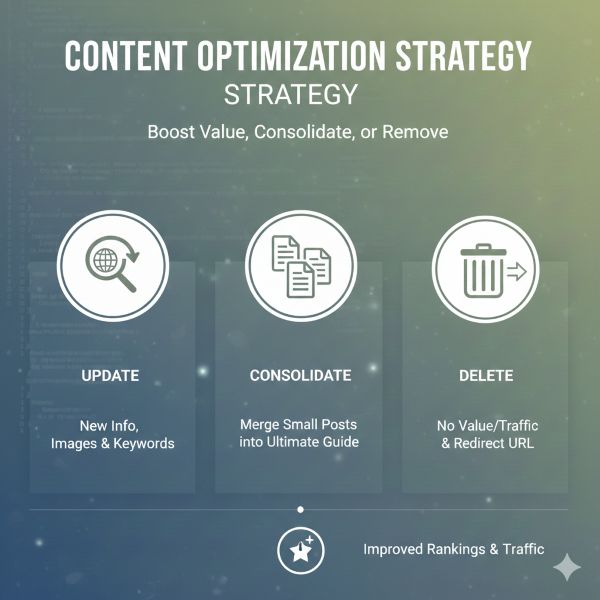
You have three choices:
- Update: Add new info, better images, and current keywords.
- Consolidate: Merge three small posts into one “Ultimate Guide.”
- Delete: If the post provides no value and gets no traffic, delete it and redirect the URL to a relevant page.
Why “E-E-A-T” is the Secret Sauce
Google ranks pages by assessing Experience, Expertise, Authoritativeness, and Trustworthiness (E-E-A-T).
- Experience: Show that you’ve actually used the products or visited the places you’re writing about.
- Expertise: Use technical terms correctly and provide deep insights.
- Authoritativeness: Get other reputable sites to link back to you.
- Trust: Have a clear “About” page, contact info, and a privacy policy.
Essential SEO Checklist: Quick Fixes for Massive Growth
| Task | Action Item | Why It Matters |
| Check Visibility Settings | Turn off “Discourage search engines” under Settings → Reading. | If this is on, Google is literally banned from showing your site to anyone. |
| Clean Your URLs | Set Permalinks to “Post Name” in your WordPress settings. | Short, keyword-rich URLs rank higher and get more clicks than random numbers. |
| Prioritize Speed | Compress images with WebP and delete any plugin you haven’t used in 3 months. | A fast site reduces bounce rates and is a confirmed Google ranking factor. |
| Link Intentionally | Add at least 2 internal links to every new post you publish. | This passes “link juice” across your site and helps Google discover your new content faster. |
| Audit for Mobile | Open your site on a physical smartphone and try to click every button. | Google uses “Mobile-First Indexing”; if it’s hard to use on a phone, you won’t rank on desktop either. |
Stop Dreaming and Start Optimizing
SEO isn’t a “one and done” task; it is a consistent habit of excellence. By avoiding these common WordPress SEO mistakes, you aren’t just trying to “trick” an algorithm, you are building a better, faster, and more reliable experience for your human readers.
When your site is technically sound, easy to navigate, and highly visible, your traffic and conversions will naturally follow.
The digital world is loud, but it isn’t impossible to break through. Don’t let technical errors be the reason your unique voice isn’t heard. Go through this checklist today, audit your settings, and watch your rankings climb.
Stop Guessing and Start Growing
Struggling to rank your WordPress site? I help creators transform traffic-dead sites into high-performing growth engines.
Let’s Work Together: If you want a personalized SEO strategy or a full site audit, let’s connect:
- Email: bonnyelangbam@gmail.com
- Expertise: 1-on-1 SEO Coaching, Technical WordPress Audits, and Premium Content Strategy.
How long does it take to see results after fixing these WordPress SEO mistakes?
SEO is a marathon, not a sprint. Typically, you may see minor changes in 2 to 4 weeks as Google re-crawls your pages. However, for significant ranking jumps on competitive keywords, it can take 3 to 6 months of consistent optimization.
Is a dedicated SEO plugin necessary for WordPress SEO mistakes?
While you can do SEO manually, it is incredibly inefficient. Plugins like Rank Math or Yoast SEO provide the necessary infrastructure for Meta tags, Schema, and Sitemaps that would otherwise require manual coding
Will changing my permalinks break my old links and social shares?
Yes, unless you take action. Changing permalinks on an established site requires setting up 301 redirects with a redirection plugin to tell Google and users the page has permanently moved.
Does the number of plugins really affect my site’s performance and SEO?
It is a common myth that the number of plugins matters. What matters is the quality. One poorly coded plugin can do more damage to your site speed than twenty well-coded, lightweight ones. Always check a plugin’s impact on load time before committing.
How do I know if my site is truly mobile-friendly?
Don’t rely on your own phone alone. Use Google PageSpeed Insights or the Mobile Usability report in Google Search Console to identify issues like buttons too close together or content wider than the screen.