Affiliate Disclosure: This post contains affiliate links. If you click and make a purchase through links to providers like Bluehost or SiteGround, I may earn a small commission at no extra cost to you. I only recommend tools I have personally used in my 11+ years of development experience.
I see it every single week. A budding entrepreneur or a passionate creator comes to me, excited to finally launch their website. They’ve heard the “use WordPress” advice a thousand times. But then they hit a wall.
The moment they discover WordPress.com vs WordPress.org, that excitement often turns into total confusion. They realize there are two different versions of what appears to be the same platform, and suddenly, they’re unsure which path to take.
If you’re staring at two different login screens, wondering why on earth there are two versions of WordPress, don’t worry, you aren’t alone. Understanding WordPress.com vs WordPress.org is one of the single biggest stumbling blocks for beginners starting their website journey.
Choosing the wrong one isn’t just a minor inconvenience; it can drain your budget and leave you stuck with a platform that won’t let you grow. Let’s dismantle the confusion together and find the version that actually fits your vision.
In the world of digital publishing, the WordPress.com vs WordPress.org debate is legendary. One offers simplicity and a hands-off approach, while the other offers the keys to the kingdom.
My goal today is to give you a transparent, author-driven perspective on which path leads to success and which might lead to a dead end for your specific goals.
The Core Difference: Are You Renting or Owning?
Before we get into the “tech-speak,” I like to use a simple real estate analogy to explain the fundamental difference between these two platforms.
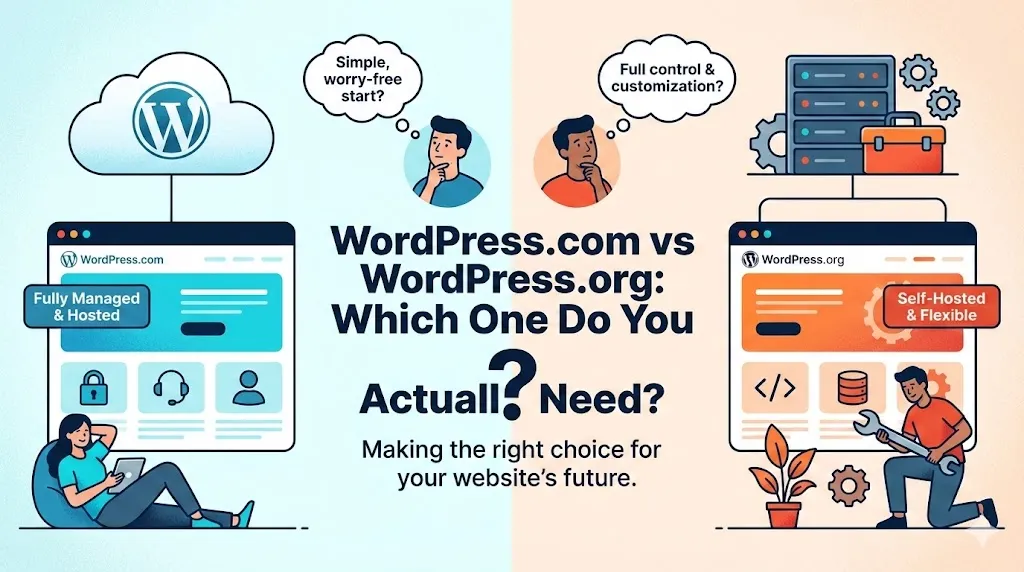
- WordPress.com is like renting an apartment. You don’t have to worry about the roof leaking or the security system, the landlord (Automattic) handles all the maintenance. But there’s a catch: you can’t knock down walls, you have to follow their house rules, and at the end of the day, you don’t own the property.
- WordPress.org is like buying your own house. You have 100% control. Want to paint the walls neon green? Go for it. Want to build an extension? You can. But you are the one responsible for the upkeep, the security, and paying the bills (hosting).
Understanding the WordPress.com vs WordPress.org Infrastructure
When we compare WordPress.com vs WordPress.org, we are essentially comparing a “Service” vs. “Software.” The .org version is the raw software, the engine, that you take and put into your own car (your host).
The .com version is a full-service car rental where they choose the fuel, the speed limits, and the route.
WordPress.org: The Self-Hosted Powerhouse
When I talk about a “professional WordPress site,” I am almost always talking about WordPress.org.
This is the free, open-source software that powers over 43-45% of the internet. If you want to build a brand that lasts, understanding the benefits of the WordPress.com vs WordPress.org trade-off starts here.
Why I Recommend It (The Pros)
- Total Ownership: You own every byte of data. No one can shut you down for a “terms of service” violation unless you’re doing something illegal.
- Ultimate Customization: This is where the magic happens. You can install any of the 59,000+ plugins available. Want to use Elementor to design a stunning landing page? No problem.
- Unfiltered Monetization: You keep every cent. You can run ads, sell products via WooCommerce, or set up a membership site without the platform taking a cut or telling you “no.”
The Reality Check (The Cons)
- The Learning Curve: You’re the captain now. You need to manage your own updates and backups (though, to be fair, most good hosts handle the heavy lifting for you these days).
- Upfront Cost: It’s not “free” like a hobby blog; you have to invest in your hosting and domain.
Bonny’s Pro Tip: If you are building a business, an online store, or a serious portfolio, WordPress.org is the only choice. Period.
Feature Showdown: The Details
| Feature | WordPress.com (Free/Personal) | WordPress.org (Self-Hosted) |
| Setup Cost | $0 | Cost of Hosting (~$4-10/mo) |
| Plugins | Not Allowed (unless on $25/mo+ plan) | Full Access (Free) |
| Monetization | Restricted (No AdSense on lower tiers) | Unlimited (AdSense, Affiliate, etc.) |
| Maintenance | Handled for you | You (or your Host) |
| Ownership | Rented (Terms of Service apply) | 100% Owned by You |
WordPress.com: The Managed Service
This is a hosting service run by Automattic. They take the WordPress software and “manage” it for you. When people look at WordPress.com vs WordPress.org, they are often lured by the promise of “free.”
The Upside of the Service
- Zero Stress: You don’t have to worry about security patches or technical glitches. It’s incredibly easy to use if you just want to write.
- Free (To Start): If you just want a digital diary, you can start for $0.
The Downside (Where it gets tricky)
- The “Paywall” Problem: This is the biggest shock for my clients. On the lower plans, you cannot install custom plugins. If you want the same power as a $5/month self-hosted site, WordPress.com makes you pay for the “Business Plan,” which is significantly more expensive.
- Limited Branding: On the free version, your URL looks like yourname.wordpress.com. In my view, nothing says “hobbyist” faster than a subdomain.
Feature Showdown: The Details
1. The Budget Factor
I often see people choose WordPress.com because it’s “free.” But let’s look at the math. To get SEO tools or custom themes on .com, you’re looking at $300/year.
On the .org side, you can get high-quality hosting for $60–$80/year and have more freedom. In the long run, the WordPress.com vs WordPress.org cost comparison favors the self-hosted route every time.

2. SEO & Plugins
If you want to rank on Google, you need SEO plugins.
- WordPress.org: Full access to everything from day one.
- WordPress.com: You’re locked out of third-party SEO tools unless you’re on the expensive Business plan.
3. Monetization and Google AdSense
If your goal is to make money, the WordPress.com vs WordPress.org decision is already made for you. AdSense is the gold standard for bloggers.
How to Get AdSense Approval on WordPress
Getting your site approved by Google AdSense requires a professional setup. Google wants to see a clean, navigable site with high-quality content.
On a self-hosted WordPress.org site, you can easily add the required code snippets to your header and create the necessary “Privacy Policy” and “About” pages that Google looks for. On the free version of WordPress.com, you aren’t even allowed to apply for AdSense.
With WordPress.com’s WordAds system taking a cut of your revenue, the choice is clear—if you want full control over your earnings, WordPress.org wins the WordPress.com vs WordPress.org comparison.
High-Quality Content Requirements for AdSense
Google requires a “Privacy Policy” page, an “About Us” page, and a clear navigation menu—all of which are easier to customize on WordPress.org.
Deep Dive: Scaling Your Business
As your traffic grows, your needs change. If you start on a platform that limits your bandwidth or charges you more as you get more visitors, you’re going to feel the “success tax.” This is a major factor in the WordPress.com vs WordPress.org debate.
With a self-hosted site, you can upgrade your hosting plan to a VPS or a dedicated server as you scale. With the managed service, you are tied to their specific pricing tiers, which can become prohibitively expensive for a growing small business.
Security and Maintenance
Many people fear the self-hosted route because they don’t want to get hacked. While it’s true that you are responsible for security on WordPress.org, modern hosting companies like SiteGround or Bluehost offer managed security features.
You get the best of both worlds: the freedom of WordPress.org with the peace of mind of WordPress.com. When deciding between WordPress.com vs WordPress.org, don’t let fear of technical details push you toward a platform that could limit your creative potential.
Bonny’s Final Verdict on WordPress.com vs WordPress.org
If you want a personal diary, you don’t care about making money, and you never want to see a “server setting” in your life, WordPress.com is a fine place to be. It’s a low-stakes environment for hobbyists.
However, if you are a small business owner, a freelancer, or a blogger who wants to build a real asset, WordPress.org is the clear winner.
The freedom to scale, the ability to get AdSense approval without jumping through hoops, and the long-term cost savings are simply too big to ignore.
Your choice between WordPress.com and WordPress.org lays the foundation for your entire online presence. Don’t build your digital home on borrowed ground.
“Who Should Choose What” – Summary
- The Hobbyist: Choose WordPress.com if you want a simple, no-cost digital diary and don’t care about custom branding or making money.
- The Entrepreneur: Choose WordPress.org if you want to build a professional brand, get AdSense approval, and have total control over your business growth.
Stop guessing. Start growing. Choosing between WordPress.com vs WordPress.org is only the beginning. Join my inner circle to master SEO, secure AdSense approval, and optimize site speed.
About Bonny Elangbam
With 11+ years in the dev industry, Bonny Elangbam has helped countless clients migrate from restrictive platforms to the freedom of self-hosting.
Having worked extensively on both WordPress.com vs WordPress.org infrastructures, I provide an unbiased, technical perspective to help you avoid the “success tax” and build a site that grows with your business. Contact me for further details.
Which is better for an online store?
WordPress.org is superior. Using WooCommerce on a self-hosted site gives you infinite flexibility without the high monthly platform fees of .com.
Can I move from .com to .org later?
Yes, you can export your content, but it can be a headache. It’s always easier to start where you want to end up.
Does WordPress.com vs WordPress.org affect my Google ranking?
Directly? No. Indirectly? Yes. Because .org allows for better SEO plugins and faster performance optimizations, it is generally easier to rank a self-hosted site.
What is the “Business Plan” in WordPress.com?
This is the tier where WordPress.com starts acting more like WordPress.org, allowing plugins and themes. However, it costs significantly more than standard web hosting.
Can I use my own domain on the free plan?
You must upgrade to a paid WordPress.com plan to use a custom domain.