Disclosure:This post may contain affiliate links. Any commissions earned help support this site, and all recommendations are based on tools I actively use in my professional workflow.
Are you ready to claim your corner of the internet? My name is Bonny Elangbam, and after a decade of building high-performance digital ecosystems, I’ve seen thousands of beginners stumble at the very first hurdle.
They think the “tech” is the hard part. It’s not. The real challenge is making the right choices when you buy a domain and hosting so you don’t end up with a slow, insecure site six months down the line.
In this masterclass, I’m going to strip away the jargon and show you exactly how to buy a domain and hosting like a pro.
We’ll cover the 2026 standards for speed, security, and the critical link, nameservers, that keep your site alive.
At-a-Glance: Pro Setup
- Domain: Register via Namecheap or Cloudflare for privacy.
- Hosting: Use Hostinger (Value) or SiteGround (Performance).
- Connection: Point Nameservers from Registrar to Host.
- Security: Enable Free SSL immediately.
- Expert Tip: Keep your domain and hosting separate for better security and flexibility.
Why You Must Buy a Domain and Hosting the Right Way
Think of your domain as your permanent street address (e.g., bonnyelangbam.com) and your hosting as the actual plot of land where your house sits. If the land is shaky (bad hosting), your house collapses. If the address is hard to find (bad domain choice), no one visits.
When you buy a domain and hosting, you aren’t just spending money; you are investing in your brand’s “Core Web Vitals”, the metrics Google uses in 2026 to decide if you deserve to rank on page one.
Step 1: Buying a Domain Name and Securing Your Brand
Your domain is your digital identity. While many hosts offer a “free domain” for the first year, I often recommend keeping your assets separate for maximum security. Here is how I handle it for my high-end clients.
1.1 Choose a Reputable Registrar
A registrar is where you officially record your name. In 2026, I recommend these three for their reliability:
- Namecheap: My top pick for balance. They offer free WHOIS privacy and a clean interface.
- Cloudflare Registrar: If you want “at-cost” pricing without markups.
- Porkbun: Quirky name, but incredibly transparent pricing and great support.
1.2 Search for Your Perfect Name
When you search for a name, stick to the .com extension if possible. It carries the highest level of trust. If your dream name is taken, don’t use hyphens. Instead, add a verb or a brand identifier.
1.3 Purchase and Enable Privacy
When you go to buy a domain and hosting, never skip WHOIS Privacy Protection. Without it, your personal phone number and home address are available to every spammer on the planet. Most good registrars now include this for free.
Step 2: How to Buy Hosting (The 2026 Performance Standards)
In 2026, “fast” is no longer enough; you need “High Performance.” This means looking for servers that support PHP 8.4+, NVMe storage, and Edge Caching.
According to 2026 industry benchmarks, your infrastructure must meet specific technical thresholds to stay competitive. When you secure your digital assets, ensure your provider supports:
- TTFB (Time to First Byte): Must be <200ms to satisfy Google’s Core Web Vitals.
- Protocol Standards: Look for HTTP/3 (QUIC) and Brotli compression as defaults.
- Architecture: Aim for NVMe storage (which is 7x faster than standard SSDs) and PHP 8.4 for optimal WordPress execution speeds.
2.1 Determine Your Hosting Type
| Hosting Type | Ideal For | My Take |
| Shared Hosting | New bloggers, local sites. | Great for budgets, but ensure it uses LiteSpeed servers. |
| Managed WordPress | Serious brands, e-commerce. | Best “set and forget” option with expert support. |
| VPS (Cloud) | High-traffic, tech-savvy users. | Maximum control and speed (I use xCloud or Cloudways). |
Technical Precision & 2026 Standards
- Precision Metric: “When you buy a domain and hosting, aim for a TTFB (Time to First Byte) under 200ms. This ensures your server starts talking to the browser almost instantly.”
- Source Citation (Paraphrased): “In 2026, the standard for performance is PHP 8.4+ and HTTP/3. These protocols allow for ‘0-RTT handshakes,’ making your site secure without sacrificing speed.”
Hosting Performance & Pricing Comparison (2026 Estimates)
| Provider | Entry Price | Renewal Rate | Best For | PHP Support |
| Hostinger | $2.99/mo | $7.99/mo | Budget Beginners | PHP 8.4+ |
| SiteGround | $3.99/mo | $17.99/mo | Superior Support | PHP 8.4+ |
| WP Engine | $20.00/mo | $30.00/mo | Enterprise Sites | Managed Only |
2.2 Select a High-Quality Provider
When you buy a domain and hosting, the host’s support is your lifeline.
- SiteGround: Still the gold standard for beginner support and speed.
- Hostinger: The value leader for 2026 with an impressive global CDN.
- WP Engine: For those who want enterprise-grade security and don’t mind the price tag.
2026 Hosting Comparison: Entry vs. Long-Term Costs
| Provider | Intro Price* | Renewal Rate | Billing Cycle | Best For |
| Hostinger | $2.99/mo | $7.99/mo | 48-Month Term | Budget Efficiency |
| SiteGround | $3.99/mo | $17.99/mo | 12-Month Term | Premium Support |
| WP Engine | $20.00/mo | $30.00/mo | Monthly/Yearly | Managed Scalability |
| *Introductory prices typically require a 12-to-48-month commitment. |
Step 3: How to Link Your Domain to Your Hosting Account
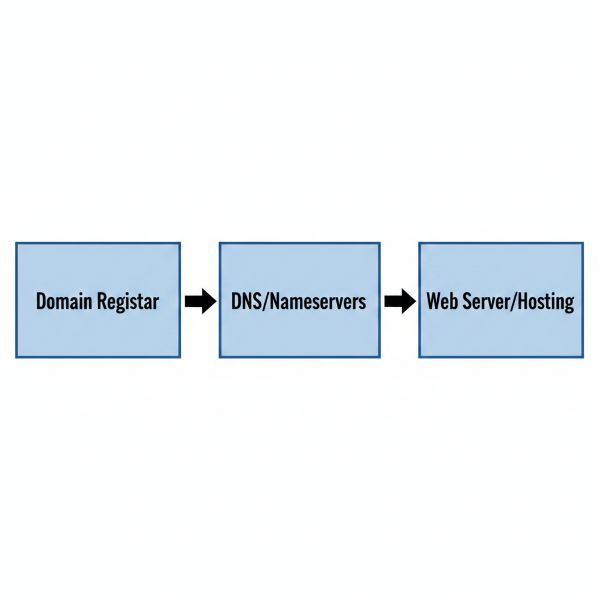
This is where 90% of beginners get stuck. If you bought your domain and hosting from different companies, you must “point” your domain to your host using Nameservers.
3.1 Locate Your Hosting Nameservers
Log in to your hosting dashboard. You are looking for two lines of text that look like this:
- ns1.yourhost.com
- ns2.yourhost.com
3.2 Update Your Registrar Settings
Log in to your domain registrar (e.g., Namecheap), find your domain, and look for “Nameservers.” Select Custom DNS and paste those two lines.
3.3 Wait for DNS Propagation
The internet needs time to update its “phone book.” This can take anywhere from 10 minutes to 24 hours.
Use a tool like WhatsMyDNS.net to track the progress globally.
Step 4: Final Security Check After You Buy a Domain and Hosting
Once connected, your first task is to activate your SSL Certificate. In 2026, browsers will mark your site as “Not Secure” if you don’t have that little padlock icon.
Most hosts provide this for free via Let’s Encrypt, just click “Enable” in your dashboard.

Step 5: Advanced Strategies for Domain Longevity
When you buy a domain and hosting, you shouldn’t just think about today; you need to think about five years from now. I always advise my clients to enable Auto-Renewal.
There is nothing more heartbreaking than building a successful business only to have a competitor “snatch” your domain because you forgot to pay a $15 invoice.
Furthermore, consider the “Brand Ecosystem.” If you are serious about your business, it is wise to buy the .net and .org versions of your name, too. This prevents others from riding your coattails or confusing your customers.
Step 6: Optimizing Hosting for SEO
Many people think that once they buy a domain and hosting, the SEO work starts with content. Incorrect. SEO starts with your hosting infrastructure. In 2026, Google emphasizes LCP (Largest Contentful Paint).
If your host takes 3 seconds just to respond to a request, you’ve lost the ranking game before you’ve even written a blog post.
Look for features like Brotli Compression and HTTP/3 support. These are technical “must-haves” that come standard with premium hosts but are often missing from “bargain-bin” hosting services.
Step 7: The Security Layer (Beyond the Basics)
After you buy a domain and hosting, you need a firewall. While your host might have one, I highly recommend using Cloudflare as a middleman.
It sits between your domain and your hosting, filtering out malicious traffic before it even touches your server.
This not only keeps you safe from hackers but also saves your hosting resources for real human visitors.
Step 8: Understanding Data Centers and Latency
When you go to buy a domain and hosting, the host will often ask where you want your server to be located. Choose the location closest to your audience.
If you are a business in New York, don’t host your site on a server in London. This physical distance creates “latency,” making your site feel sluggish to your local customers.
Checklist: Before You Buy a Domain and Hosting
- [ ] Brainstorm 3 variations: Don’t get stuck if your first choice is taken.
- [ ] Check Social Handles: Is the name available on X, Instagram, and TikTok?
- [ ] Verify SSL Inclusion: Ensure your host offers “Let’s Encrypt” for free.
- [ ] Global Server Locations: Pick a data center close to your target audience.
5 Common Mistakes Beginners Make
- Chasing “Penny” Hosting: Saving $2/month usually costs you 2 seconds in load time.
- Skipping Domain Privacy: You’ll receive 50+ spam calls within a week without it.
- Using Complex Extensions: Stick to .com. Avoid .biz or .info for professional brands.
- Ignoring Renewal Rates: Always check the “Year 2” price before you commit.
- Forgetting Auto-Renew: Losing a domain because an invoice expired is a nightmare.
Take Action with Bonny Elangbam
Learning how to buy a domain and hosting is the literal foundation of your online success. It’s the bridge between a simple idea and a global digital presence.
By following this guide, you haven’t just secured your digital property—you’ve positioned your site to be fast, secure, and future-ready. The right foundation today prevents costly migrations, performance issues, and security headaches tomorrow.
If you want personal guidance on choosing the right domain, selecting high-performance hosting, or setting up WordPress the right way from day one, contact me. I help creators and businesses build scalable websites that don’t just exist online, but grow, convert, and last.
Don’t let the fear of technical steps hold you back. The internet is built on these simple blocks. Would you like me to help you set up your professional email address (e.g., info@yourdomain.com) now that your hosting is ready?
About the Author: Bonny Elangbam
Bonny Elangbam is a seasoned Web Development Architect and Digital Strategist with over a decade of experience in scaling online presences.
Having successfully launched over 500+ websites, Bonny specializes in high-performance WordPress infrastructure, SEO-driven architecture, and secure hosting environments.
I am dedicated to helping entrepreneurs skip the “technical debt” and build digital assets that are fast, secure, and ready to convert.
Can I buy a domain and hosting from different companies?
Yes! In fact, as an expert, I often recommend it. It gives you more control and adds a layer of security. If your hosting ever has an issue, your domain remains safe and easy to move.
How much does it cost to buy a domain and hosting in 2026?
Expect to pay about $10–$15 per year for a .com domain and between $4 to $15 per month for reliable shared or managed hosting.
Do I need to buy a domain and hosting every year?
Your domain is a recurring annual subscription. Your hosting can be paid monthly or annually. I recommend 1-year or 2-year plans to lock in lower introductory rates.
What is the most common mistake when people buy a domain and hosting?
The biggest mistake is choosing the cheapest host possible. Slow servers kill your SEO rankings and frustrate users. Always prioritize “TTFB” (Time to First Byte) over a $1 saving.
Is a “Free SSL” enough for my website?
For 99% of websites, yes. A free Let’s Encrypt SSL provided by your host is perfectly secure and recognized by Google and all major browsers.